The SM needs paperwork
Stage management runs the show off paper and PDFs, not off your desk. Every version of the sequence means retyping cue numbers into a spreadsheet at midnight.
Cue-sheet exporter for grandMA3 (+ MA2 via the Pro viewer)
CUEPRINT is a Lua plugin that runs inside grandMA3. Lite walks your sequence — cue numbers, names, triggers, fades, delays — and writes a clean CSV your stage manager and production office can actually use. Pro adds the guion: a single self-contained HTML page with the per-fixture values stored in every cue (dimmers, colors with real swatches, positions, presets), generated in one step on the console and printable to PDF from any browser. The Pro viewer also reads grandMA2 sequence XML exports, so MA2 desks get the same rundown from their native export.
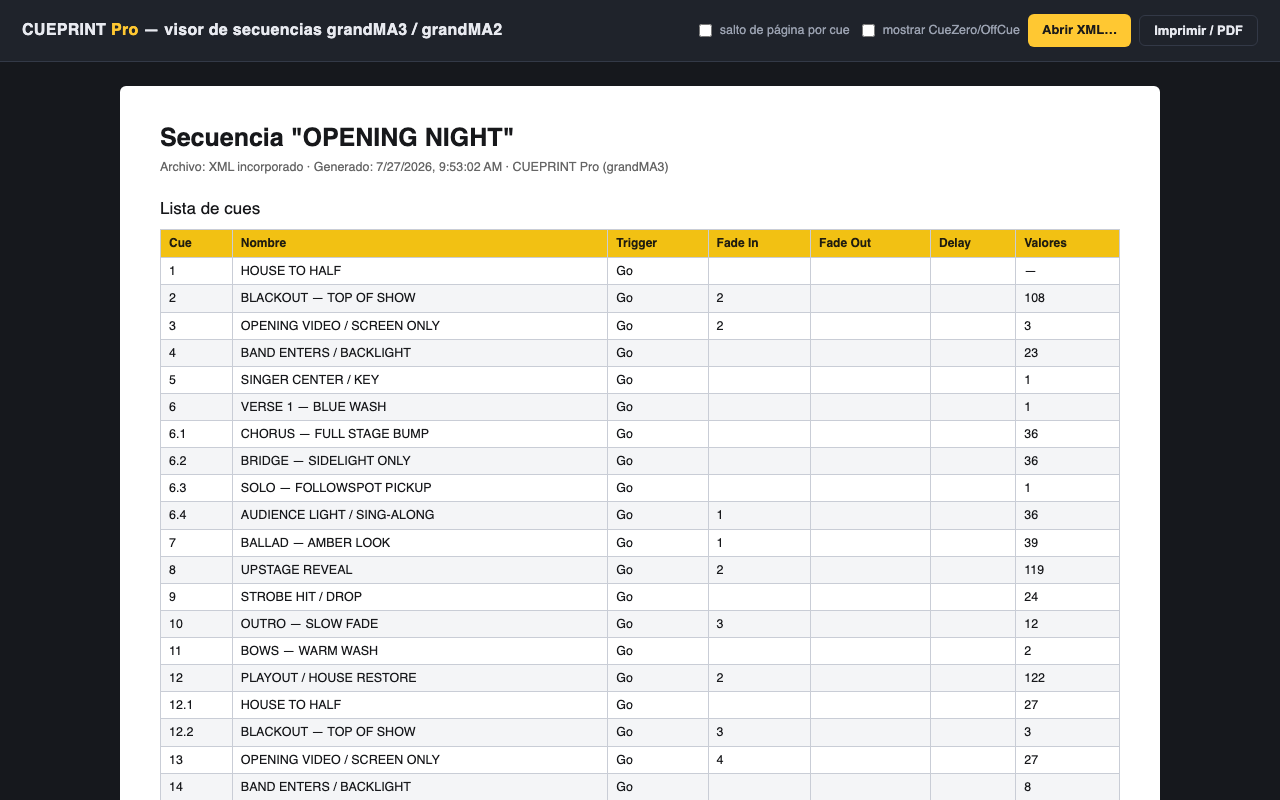
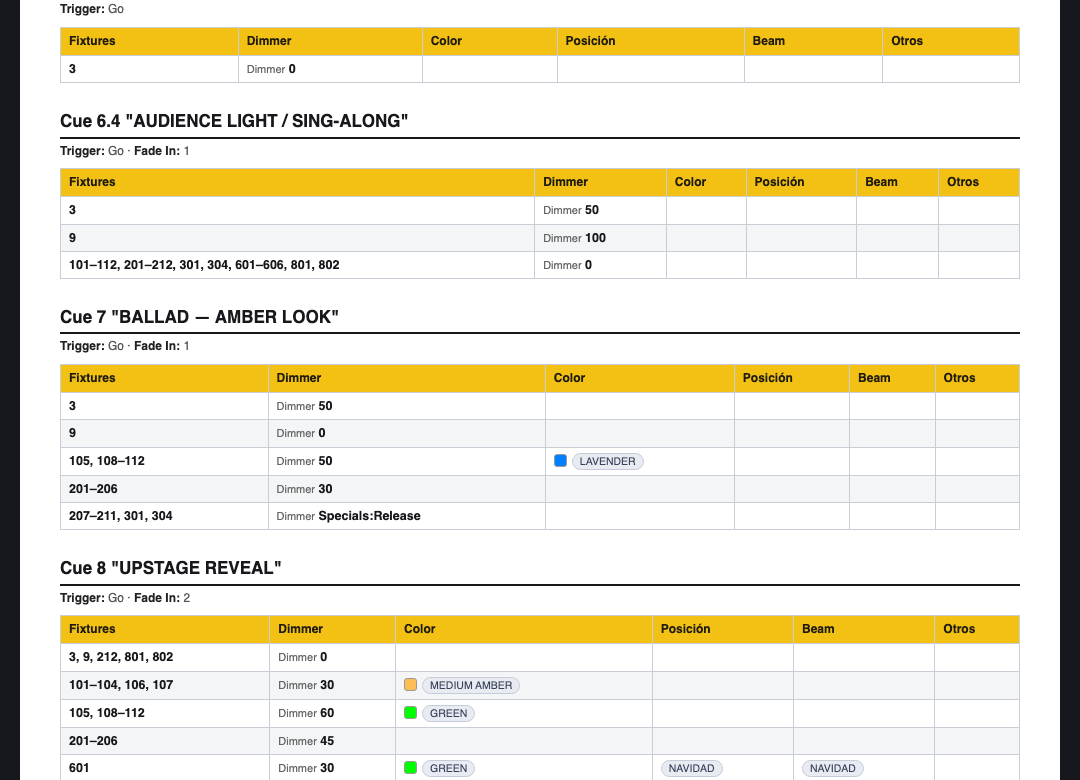
↑ real plugin output from a console-exported sequence — cue names anonymized
01 / The problem
Stage management runs the show off paper and PDFs, not off your desk. Every version of the sequence means retyping cue numbers into a spreadsheet at midnight.
Followspot operators need cue, target and pickup on a page clipped to the truss. Reading it off the console screen over comms does not scale past cue 12.
Handing off a show file without a human-readable cue sheet is handing off a locked room. Archive the paperwork with the show and the revival takes hours, not days.
02 / How it works
Drop cueprint.lua + cueprint.xml in gma3_library/datapools/plugins/ and import into the Plugin pool. Two minutes, one time.
Pick sequence and mode in the popup — Lite writes the CSV cue list, Pro builds the full per-fixture guion. Nothing leaves the console.
The CSV opens clean in Excel or Sheets — Spanish or international format, your pick. The Pro guion opens in any browser and prints to PDF in one click.
03 / Sample output
Toggle tiers: Lite is the CSV cue list, Pro is the per-fixture guion. Real column names, real layout — this is what CUEPRINT writes.
Trigger: Go · Fade In: 2.5 · Delay: 0.5
| Fixtures | Dimmer | Color | Position | Beam |
|---|---|---|---|---|
| 101–106 | 100 | MEDIUM AMBER | BAND | · |
| 201, 202 | 80 | RED | · | ZOOM 45 |
| 301 | 75 | · | SOLO CS | GOBO 3 |
Trigger: Time 5 · Fade In: 1.2
| Fixtures | Dimmer | Color | Position | Beam |
|---|---|---|---|---|
| 101–106, 201, 202 | 0 | · | · | · |
| 301 | 100 | WARM WHITE | VOX | · |
04 / Field record
CSV and guion validated on a real grandMA3 console mid-production — cue numbering, fade columns and Excel formatting checked against the desk, not a simulator.
A 68-cue theatre show exported to XML on a grandMA2 and printed through the Pro viewer — the MA2 parser is validated against real v3.9 exports, not the spec.
Every property read is guarded and logged, and Discovery mode ships in the plugin — any future MA3 version can verify its own property names before show-critical use.
Features
The essentials. Any sequence out to a clean CSV with the core columns.
The whole rundown. Per-fixture values per cue, one step, MA2 exports too.
Compatibility
| Platform | Versions | Lite | Pro | Note |
|---|---|---|---|---|
| grandMA3 console | v2.x (tested v2.4) | ● | ● | |
| grandMA3 onPC (Win/Mac) | v2.x (tested v2.4) | ● | ● | |
| grandMA2 / MA2 onPC | v3.9 XML exports (validated on v3.9.61) | — | ● | Via the Pro viewer: export the sequence to XML on the desk (the export MA2 has always had), drop it on the viewer. Nothing installs on the console. |
| dot2 | — | — | — | Not supported |
Version-by-version details live in the troubleshooting guide; release history in the changelog.
Buy
| Feature | Lite $4.99 | Pro $7.99 |
|---|---|---|
| grandMA3 console & onPC (v2.x) | ● | ● |
| CSV cue list (cue, name, trigger, fades, delay) | ● | ● |
| Sequence by number, name or selection | ● | ● |
| Excel format: Spanish (;) / international (,) | ● | ● |
| Guion HTML — per-fixture values per cue | — | ● |
| Color swatches, preset chips, look grouping | — | ● |
| One-step export from the console | — | ● |
| Print to PDF from any browser | — | ● |
| grandMA2 support (XML exports via viewer) | — | ● |
| Free 1.x updates | ● | ● |
| Support | Priority email | |
| One-time purchase · 14-day refunds | Buy Lite | Buy Pro |
Checkout, VAT/sales tax, receipts and license keys handled by Lemon Squeezy (Merchant of Record).
FAQ
Copy cueprint.lua and cueprint.xml into gma3_library/datapools/plugins/ (console via USB stick, onPC on the local drive), then import cueprint.xml into a Plugin pool slot. The install guide walks through it click by click.
Pick "Pro (guion HTML)" in the plugin popup and type the sequence number. The plugin runs MA3's own sequence export, reads the XML, and writes one self-contained HTML file with the cue list plus every stored fixture value per cue. Open it in any browser and print to PDF. It shows stored values only (what each cue changes), like the classic MA2 sheet — not tracked state.
The way MA2 cue sheets have always been made: export the sequence to XML on the desk, then print from the HTML. That HTML step died when modern browsers dropped Internet Explorer's XSL rendering — the Pro viewer brings it back. Drop the XML onto it in any browser: it auto-detects the format and produces the guion. Parsing is validated against real MA2 v3.9 exports. Nothing installs on the MA2.
Instantly, by email. LemonSqueezy sends you a download link for the plugin .zip and your license key the moment checkout completes. You can re-download any time from the link in that email.
It is your proof of purchase, used for support and upgrade verification. The plugin never phones home — MA3 Lua is sandboxed and has no network access — so there is nothing to activate and it works on machines with no internet.
The license is per person, not per desk. Install it on your consoles, your onPC rig and your backup — as long as it is you operating, you are covered.
All 1.x updates are free for both tiers. When an update ships, you re-download from your original LemonSqueezy link, replace the plugin file and re-import. The changelog lists every release.
14 days, no questions asked. If it does not work with your workflow, reply to your receipt email and you get your money back. See the refund policy page for details.
Install path, import steps and the full reference are in the CUEPRINT manual.
14-day refund policy · free 1.x updates · no subscription